Cadet Tech

Friday, November 4, 2022

🧠🤖 Study Guides with Automated Feedback in Forms

9:54 AM 0
🧠🤖 Study Guides with Automated Feedback in Forms

I have said this before and I will keep saying it. Google Forms is one of the most versatile tools we have! You can customize a form to provide feedback to students based on the answers that they submit as well as navigate them to various sections. With a few clicks, you can have the ultimate study guide, self assessment, review activity and more! 

With the addition of the auto save in Google Forms (Yay for updates!) students can come back to their form for up to 30 days which saves their progress automatically. I even created some templates for you to copy and use, see below! 


Check it out! 

Here is a breakdown of the steps 

1.  Create your form. You want your form to be a "Quiz" which means it will allow you to mark responses as "correct" or "incorrect". Keep in mind, these don't have to be right or wrong they could be as simple as "I Can" statements around what they should know. 


2. Set the feedback for your "correct" or "incorrect" responses. You can link to notes pages, review sheets, videos, etc.


If you wanted to create a study guide that jumps students to sections based on their responses here is how to do that. 

1. Create and title the sections. Add directions, resources, questions, whatever you want students to review.

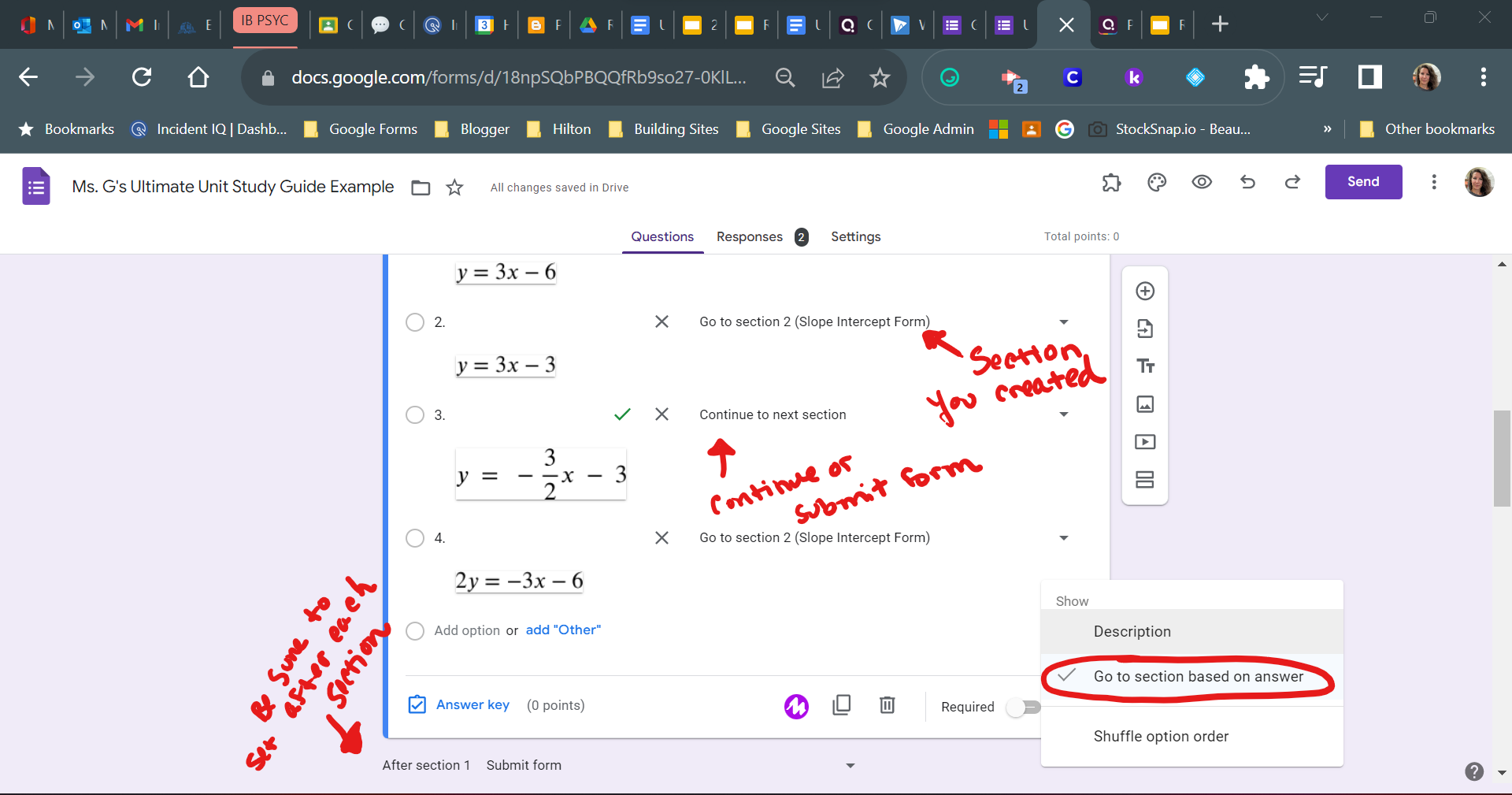
2. Select the question that you want to determine where the student goes next. Click the three dots and choose "Go to section based on answer". Set the each choice to either go to that specific section you created or "Go to next section" if you want them to continue through the form or submit at the end of that section. 

Copy the Templates below! 

Unit Self Check Template

Unit Study Guide Template

Friday, October 14, 2022

🤯Custom Notebooks in Kami with Linked Pages and Sections!

10:47 AM 0
🤯Custom Notebooks in Kami with Linked Pages and Sections!


That's right... you heard me correctly. You can create a customizeable notebook for students with tabs and linked pages in Kami! 

Check out my example Notebook here: https://kami.app/mQP-imw-yX6-Ag5

It only takes a few steps, and a little finese and you will have a sweet notebook for students. Here is how I did it:

- I created the base of my notebook using Google Slides. Here I customized the size, background, and created my links to sections. Use my Slides Template and Customize It

- I used Canva to create a cover page and section background. Use my Canva Template and Customize It

- Then I convert it to Kami by uploading or selecting the document from my drive

- Then used split and merge to add my notes pages and resources into the sections that I wanted for students. 


Here is a tutorial on how to do this


Hopefully the functionality of the "Push Changes" feature will make this even better! 


Tuesday, September 27, 2022

😿Sad about losing Quizlet? Knowt More!

12:30 PM 0
😿Sad about losing Quizlet? Knowt More!
Another year without quizlet are sad times no more... Launched this September is a tool called Knowt. A free flashcard tool with Quizlet set importing, class options, and self study mode. 

Sign up at https://knowt.io/

I used the Sign in with Google SSO button (You, and your students should too) 

From your home you can Explore Notes, Flashcards and Textbooks created by other users (mostly students)


From the plus sign on your home page or a right click you can create: 
- Folders
- Notes
- Upload files from Drive or your Computer to create notes
- Create Flashcards


You can also create classes and assignments. This feature seemed to be a little quirky to me and is just out of beta so it can be glitchy. I was unsuccessful with the connect Google Classroom option under classes, but maybe you will be. You can invite students using a code. 


You can create or find notes inside Knowt on topics to create assignments for students. Here I use the explore tool to find a set from an APUSH chapter. This process is the same as creating your own notes and words for students. Here I will duplicate to a class.


If you duplicated a note to the class you want to make sure you go in and share out that notebook


If you want to be able to edit content that you find from the explore you will want to "Duplicate to Notebook". This will create your own copy that you can edit. 


You can also create and import flashcards from Quizlet. Creating and importing terms and definition is super sleek. 


Student View of assignments. Once students join your class you can create assignments in Knowt. Here my test student opens the Chapter 1 Homework I assigned above. 


Lastly, the study set options are really nice. There are new study types and quiz options coming mid month! 

Monday, September 26, 2022

Rockstar Alert! Custom "post-it" style notes for feedback

12:06 PM 0
Rockstar Alert! Custom "post-it" style notes for feedback

A note of positive encouragement and recognition goes a long way! That is why I created  custom "post it" style notes for feedback!


I'm using these to send little notes of acknowledgement, encouragment and recognition to help build communitiy and value around instructional technology at the HS! 

Think about how you can use these with your students...

  • Recognize hard work or focus
  • Draw attention to a detail in their work
  • Help students manage progress toward learning goals
  • Acknowledge an extracurricular strength
  • Praise a character trait
You get the idea... 

I used Canva to make a sweet graphic and voila... now I have custom notes. I printed the notes and had them made into a custom note pad. If you are interested in this... let's talk. We are currently going to raffle away a stack of custom notes to two people who completed the first column of the PD choice board so make sure you go and do that! 


Friday, September 16, 2022

📰 Classroom Newsletters and Announcements with Gmail Layouts

2:00 PM 0
📰 Classroom Newsletters and Announcements with Gmail Layouts


Introducing Gmail Layouts! 

When you compose a new email in Gmail you now have the ability to apply predesigned layouts and set default styles such as colors, fonts and images. 

Access the layouts

Click Compose
Select Layouts from the ribbon at the bottom of your draft email


Set Default Styles

Select colors, fonts and images that are saved to your layout for the next time you want to use a layout

Customizing a Template

Once you have selected a template swapping out the text, images and links is a breeze! 

Friday, May 13, 2022

📣Dropdown Chips in Google Docs... Endless Possibilities!

2:15 PM 0
📣Dropdown Chips in Google Docs... Endless Possibilities!
You can now create and insert custom dropdown chips in Google Docs! 


You can insert dropdown menus inline with text by typing @drop and selecting dropdown or going to Insert - Dropdown. You can also insert them as a pre made building blocks that you can edit using the Insert - Building Blocks menu. 

Inside the same document you can reuse your dropdowns by typing or inserting a dropdown and selecting a previously created dropdown but they do not show up across documents. To reuse dropdowns from one document to the other you can copy and paste your dropdown into your doc and edit as needed. 

Here are some great applications: Writing status, Close reading, Cloze Reading, Self Regulatory Checklists, Student Reflections, Rubrics, Peer Review... So Much More! 

Here is a quick look at making a dropdown chip: 


Are you loving these dropdown chips? Checkout these examples of ways you can use dropdown chips: 

Eric Curts from Ctrl + Alt + Achieve - Cloze Reading Activity


Tuesday, March 8, 2022

📷 Scan Documents and QR Codes with the Updated Chrome OS Camera!

2:38 PM 0
📷 Scan Documents and QR Codes with the Updated Chrome OS Camera!


Student Chromebook Cameras not only scan QR codes but now they scan documents as well! 

Here is how fabulous it is...

📷 Open the camera app

🔍Press the scan button

📝Choose "document" to scan hand written work, Choose "QR" to scan in a code

👍🏽 That's it!